









Markdific for Mac
- Trial version
- 4.9
- 1
- V1.1.2
Download for Mac
View an ad to download for free

- Zantific Pte. Ltd.
A better way to open, read, edit and export Markdown files.
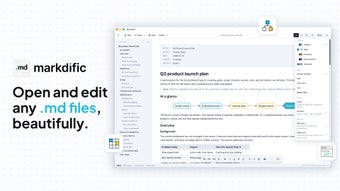
Markdific is a full-featured Markdown viewer and editor for Mac, Windows and Linux. Open, read and edit markdown .md files with clean headings, tables, code, LaTeX math, Mermaid diagrams and images. Use autosave, split view, fonts and themes, then export your document to PDF, Word or HTML.
Open and read Markdown .md files
Open Markdown files directly from your computer without importing them into a library or creating a workspace. Markdific renders the document immediately, making headings, tables, lists, code, diagrams and images easier to read.
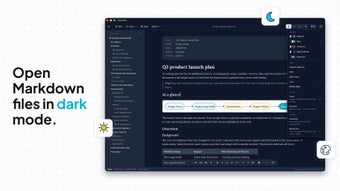
For longer documents, the outline sidebar displays the heading structure and lets you jump directly to any section. You can also adjust the appearance with different fonts and themes, or use presentation mode for a focused, full-screen reading experience with controls for document width and line spacing.
On Mac, Quick Look support lets you preview a Markdown file directly in Finder by selecting it and pressing the Space bar.
Edit with practical tools
Edit Markdown using the built-in formatting toolbar, with controls for common elements such as headings, emphasis, links, lists, tables and code. Autosave records your changes as you work, while recent files make it easy to return to documents you use regularly.
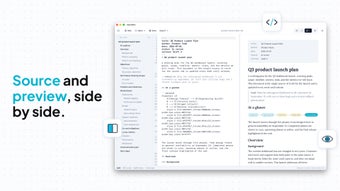
Choose the view that suits your workflow. Read the fully rendered document, work directly with the Markdown source, or use split view to place the source and rendered result side by side.
Work with rich Markdown content
Markdific supports the content commonly used in documentation, project notes, technical writing and README files, including:
Headings, paragraphs and horizontal rules
Bold, italic and strikethrough text
Bulleted, numbered, nested and task lists
Blockquotes, links and tables with column alignment
Inline code and fenced code blocks with syntax highlighting
Inline and block LaTeX math
Automatically rendered Mermaid diagrams
Web, local and pasted images - Pasted images are stored with the document so they remain available after saving and reopening. Supported images also appear in exported documents.
Export and share markdown files
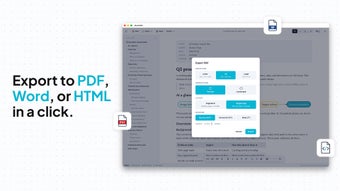
Export your completed Markdown document to PDF, Word or HTML. Create a PDF for sharing or printing, produce a Word document for collaboration, or generate HTML for publishing and use on the web.
Markdific works with ordinary .md files, so you can continue using the same documents across different computers, operating systems and compatible Markdown applications.
Loading…

App specs
Developer
- Zantific Pte. Ltd.
License
Trial version
Version
1.1.2
Latest update
Platform
Mac
OS
macOS 10.15
Language
English
Downloads
1
Size
33.01 MB
Markdific for Mac
- Trial version
- 4.9
- 1
- V1.1.2
Download for Mac
View an ad to download for free
User reviews about Markdific
Have you tried Markdific? Be the first to leave your opinion!
Add reviewTop downloads IDEs/Source Editors for Mac
Top downloads IDEs/Source Editors for Mac
Top downloads IDEs/Source Editors for Mac
Related topics about Markdific
Latest articles

X gets US backing over EU DSA fine: Washington seeks to join appeal

Apple’s iPhone 18 Pro gains ground in India: demand jumps nearly 20%

Microsoft Copilot gets a major redesign: Home, Code and Autopilot roll out

Warzone Season 1 adds a toggle to hide other players’ skins

Legion surges into Tubi’s U.S. top 10 on free streaming
Laws concerning the use of this software vary from country to country. We do not encourage or condone the use of this program if it is in violation of these laws. Softonic may receive a referral fee if you click or buy any of the products featured here.